Mastering the Square Gable Box Template for Professional Packaging Results
There is a distinct satisfaction in handing over a product packaged with care. Whether you are a small business owner shipping handmade soaps, a baker preparing wedding favors, or a hobbyist organizing a craft fair booth, the presentation of your item often speaks louder than the item itself. This is where the Square Gable Box Template becomes an invaluable asset. It offers a structured, professional look that elevates simple goods into giftable experiences. However, moving from a digital file to a physical, sturdy box involves more than just hitting "print." Many creators rush this process, overlooking critical details that can compromise the structural integrity and aesthetic appeal of their final product. By understanding the nuances of these templates, you can avoid common pitfalls and ensure every box you fold reflects the quality of your brand.
Understanding the Value of Precision Files
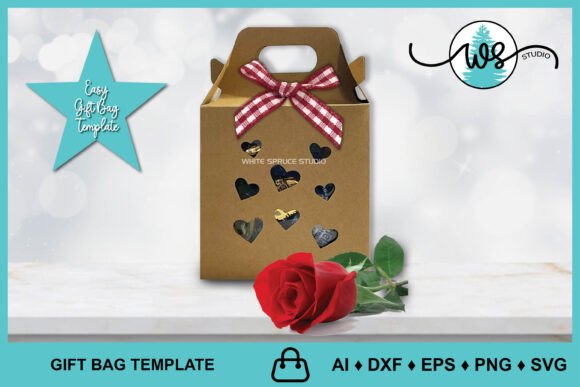
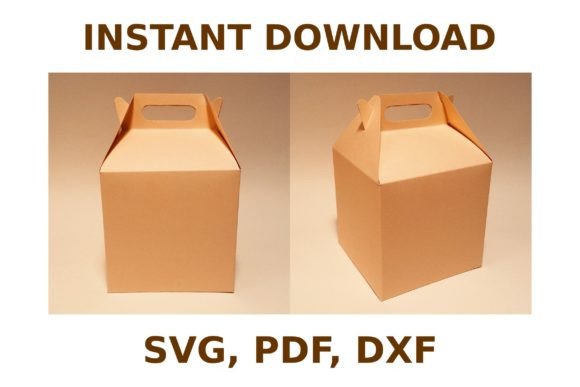
At its core, a square gable box is defined by its handle-like top and sturdy base, making it ideal for carrying items comfortably. When you access a high-quality template package—typically containing SVG, DXF, and PDF files—you are gaining access to a blueprint designed for accuracy. These formats cater to different needs: SVG and DXF files are essential for users of electronic cutting machines like Silhouette and Cricut, allowing for precise cuts and score lines without manual measuring. The PDF version serves those who prefer traditional print-and-cut methods.
The interest in these templates stems from their versatility and efficiency. Instead of sketching geometry by hand, which often leads to uneven sides and tabs that do not align, a pre-tested template ensures symmetry. Yet, a frequent misunderstanding arises when users assume that downloading a file guarantees a perfect result regardless of how it is processed. The template is only as good as the settings used to execute it. Ignoring the specific requirements of your material or machine can lead to wasted supplies and frustration.
Common Pitfalls in Material Selection and Scaling
One of the most significant errors creators make involves paper weight and scaling. A Square Gable Box Template is engineered with specific tab sizes and fold lines based on standard cardstock thickness. If you attempt to construct a box using paper that is too thin, the structure will lack rigidity, causing the sides to bow out under the weight of the contents. Conversely, using heavy chipboard without adjusting the score lines can result in cracked folds and a messy appearance.
Furthermore, the note that "measurements depend on paper size" is often overlooked. When preparing your file, especially for print-and-cut methods, failing to check the scale settings can shrink or expand the design unintentionally. For instance, if your printer defaults to "fit to page," a template designed for an 8.5x11 inch sheet might be reduced by 5%, rendering the glue tabs too small to adhere properly. Always verify that your printing or cutting software is set to 100% scale or "actual size." For electronic cutters, ensure the material size selected in the software matches the physical mat you are using to prevent alignment errors.
Navigating File Formats and Machine Compatibility
While the archive includes multiple file types, choosing the wrong one for your workflow can create unnecessary hurdles. Beginners often download the SVG file expecting it to work instantly in a word processor, or they try to import a PDF into a cutting machine without vectorizing it first. Each format has a purpose. The DXF and SVG files are vector-based, meaning they maintain crisp lines regardless of resizing, which is crucial for clean cuts on Silhouette and Cricut devices. The PDF is generally rasterized or fixed-layout, best suited for direct printing.
A subtle but impactful mistake occurs during the import phase into cutting software. Users sometimes fail to separate the cut lines from the score lines. Most quality templates use different line styles or colors to distinguish between where the blade should cut through and where it should merely crease the paper. If you treat all lines as cut lines, your box will fall apart into individual pieces. If you treat all lines as score lines, you will be tearing the paper manually, leading to jagged edges. Take the time to inspect the layers in your design software. Assign the appropriate operation to each path: a deep cut for the outline and a light score or perforate setting for the folds.
Assembly Techniques for Durability and Aesthetics
Even with a perfectly cut template, the assembly phase determines the final quality. A common oversight is neglecting to dry-fit the box before applying adhesive. Folding the box once without glue allows you to check the alignment of the gable top and ensure the bottom flaps interlock correctly. This step reveals if your scoring was deep enough; if the paper resists folding, the score line may need to be reinforced gently with a bone folder.
When it comes to adhesion, less is often more. Applying excessive glue to the tabs can cause seepage, leaving unsightly marks on the exterior of the box or warping the paper as it dries. Use a precision applicator or a glue pen to apply a thin, even layer. For a cleaner finish, consider using double-sided tape on the tabs, which provides immediate hold without drying time or mess. Additionally, pay attention to the grain direction of your paper if you are using high-end cardstock. Folding against the grain can lead to cracking, particularly on darker colors. Orienting your template so the primary folds run parallel to the paper grain can significantly improve the crispness of the corners.
Making Informed Decisions Before You Start
Before committing to a production run, it is wise to create a single prototype using scrap material similar in weight to your final choice. This test run validates the template's compatibility with your specific setup. Check the fit of your intended product inside the box. Is there enough room? Is it too loose? A well-designed Square Gable Box Template allows for slight adjustments, but knowing your dimensions beforehand saves time.
Also, consider the finishing touches. Will you be stamping, embossing, or applying vinyl decals? If so, plan these steps before assembly. It is far easier to decorate a flat piece of cardstock than to navigate the nooks and crannies of a folded box. Ensure that any decorative elements do not interfere with the glue tabs or fold lines, which could prevent the box from closing securely.
Ultimately, the goal is to create packaging that enhances your content rather than distracting from it. By respecting the technical details of the template, choosing the right materials, and taking care during assembly, you transform a simple digital file into a tangible representation of your craftsmanship. Whether you are producing ten boxes or a thousand, attention to these details ensures consistency and professionalism, turning a routine task into a rewarding part of your creative process.