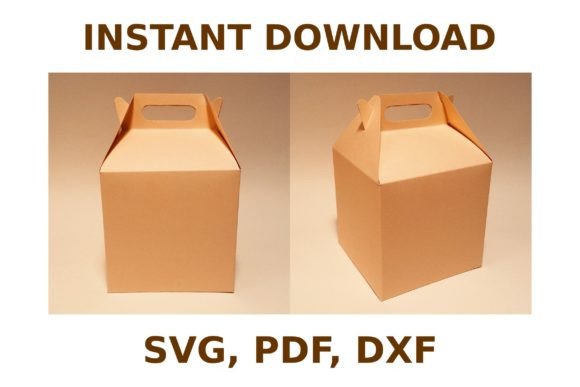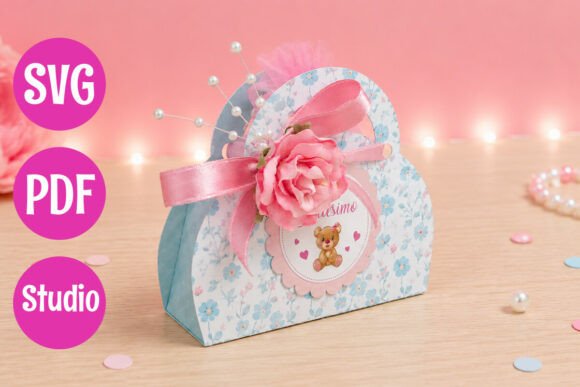
Elevate Your Event Packaging with a Professional Favor Box with Handle
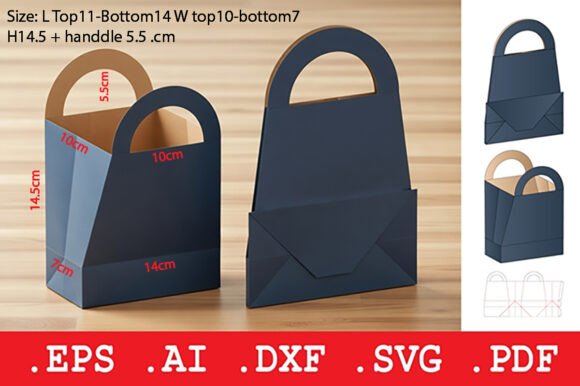
There is a distinct moment in event planning where the vision meets reality, and nothing bridges that gap quite like thoughtful packaging. Whether you are curating bomboniere for a wedding, preparing party favors for a baptism, or assembling handmade gifts for a boutique shop, the container you choose speaks volumes before the recipient even opens it. A Favor Box with Handle offers more than just a place to hold candies or small trinkets; it provides a functional, elegant vessel that guests can carry home with ease. However, moving from a digital file to a finished, sturdy product requires attention to detail. Many creators jump straight into cutting without considering the nuances of material selection, assembly techniques, and file compatibility, often resulting in packaging that looks flimsy or fails to assemble correctly.
The appeal of these boxes lies in their dual nature: they are decorative and practical. The integrated handle transforms a standard cube or prism into a miniature gift basket, adding a refined touch that elevates the perceived value of the contents inside. Yet, a common misunderstanding among beginners and even some seasoned professionals is assuming that any cardstock will yield the same professional result. When you download a template designed for machines like Cricut or Silhouette, the expectation is a crisp, clean fold and a secure lock. If you use paper that is too thin, the box may buckle under the weight of the treats. Conversely, if the material is too thick without proper score lines, the folds can crack, ruining the aesthetic. To avoid this, always test your specific machine settings on a scrap piece of your chosen material first. A 65 lb to 80 lb cardstock is typically the sweet spot for these structures, offering enough rigidity to hold shape while remaining flexible enough for clean folding.
Avoiding Assembly Pitfalls and Structural Weakness
One of the most frequent errors occurs during the assembly phase, specifically regarding the adhesive application. Because these boxes are designed to be assembled quickly, there is a temptation to rush the gluing process or use the wrong type of adhesive. Liquid glue can sometimes warp thin cardstock if applied too heavily, while double-sided tape might not hold if the surface area of the tab is too small. A better approach is to use a high-quality tacky glue applied sparingly with a precision tip, or strong double-sided tape strips placed strategically on the locking tabs. Ensure that you allow the glue to become tacky before pressing the pieces together; this prevents the box from sliding out of alignment while drying. Furthermore, do not overlook the importance of the score lines. If your cutting machine does not have a dedicated scoring tool, you may need to run a second pass with a blunt embossing tool or adjust the pressure settings to create a deep enough indentation. Without proper scoring, the "sturdy 3D result" promised by the design will never materialize, leaving you with rounded, unprofessional corners.
Another overlooked detail involves the contents themselves. It is easy to get caught up in the exterior design and forget to calculate the internal volume accurately. A Favor Box with Handle might look spacious in a digital preview, but once you factor in the thickness of the cardstock and the space taken by ribbons or internal dividers, the capacity shrinks. Before committing to cutting dozens of boxes for a large event, assemble one prototype and fill it with your actual treats—whether they are macarons, soap bars, or jewelry. This simple step prevents the embarrassment of lids that won't close or handles that tear because the box is overstuffed. If you find the fit is too tight, consider adjusting the scale of the SVG file slightly in your design software, provided the proportions remain intact.
Maximizing Efficiency with Digital Files
When purchasing or downloading these templates, you will typically receive a ZIP archive containing various file formats such as SVG, PDF, and Studio files. A significant mistake many users make is ignoring the specific file type recommended for their software. While SVG files are universally compatible with Cricut Design Space and Silhouette Studio, opening a PDF directly in a cutting program without tracing or converting it can lead to lost vector paths and inaccurate cut lines. Always import the native file format for your machine to ensure the cut lines, score lines, and fold marks are recognized correctly. Additionally, check the layer organization within the software. Well-designed templates separate cut lines from score lines onto different layers or color codes. If you skip the step of assigning the correct operation (cut vs. score) to each layer, your machine will attempt to cut through the fold lines, destroying the structural integrity of the box.
For entrepreneurs and small business owners, consistency is key. If you are producing these boxes for sale or for a client's event, variations in size or fold quality can signal a lack of professionalism. Create a jig or a folding board to ensure every crease is made at the exact same angle and depth. This small investment in workflow efficiency pays off when you are assembling fifty or a hundred units. Moreover, consider the finishing touches. The handle is a focal point; reinforcing it with a small piece of clear tape on the inside attachment points can prevent it from detaching if the guest carries a heavier item. You might also explore adding a custom tag or a wax seal to the handle, turning a standard favor into a memorable keepsake.
- Material Matters: Stick to medium-weight cardstock (65-80 lb) for the best balance of durability and foldability.
- Test Before Committing: Always cut and assemble a single sample to verify fit and structural strength before running a full batch.
- Respect the Score Lines: Ensure your machine is set to score, not cut, on fold lines to achieve sharp, professional corners.
- Adhesive Selection: Use quick-drying tacky glue or strong tape strips rather than wet glues that can warp the paper.
- File Compatibility: Download and use the specific file format (SVG, Studio, PDF) optimized for your cutting software to avoid path errors.
Ultimately, the goal is to create a packaging experience that feels intentional and polished. By taking the time to understand the mechanics of the Favor Box with Handle, selecting the right materials, and respecting the digital workflow, you transform a simple digital download into a tangible asset for your events or business. Whether you are a hobbyist crafting gifts for friends or a marketer designing branded giveaways, the difference between a good result and a great one often lies in these subtle preparations. Embrace the process of prototyping, learn from each assembly, and soon you will be producing elegant, reliable packaging that enhances every celebration it touches.